Sign In Start Free Trial
Account

Add to playlist

Create a Playlist

Modal Close icon
You need to login to use this feature.
  • Book Overview & Buying Mastering Netscaler VPX
  • Table Of Contents Toc
Mastering Netscaler VPX

Mastering Netscaler VPX

By : Marius Sandbu, Rick Roetenberg, Paul
4.9 (7)
close
close
Mastering Netscaler VPX

Mastering Netscaler VPX

4.9 (7)
By: Marius Sandbu, Rick Roetenberg, Paul

Overview of this book

Citrix NetScaler is one of the best Application Delivery Controller products in the world. The Application Delivery Controllers are commonly used for load balancing purposes, to optimize traffic, and to perform extra security settings. This book will give you an insight into all the available features that the Citrix NetScaler appliance has to offer. The book will start with the commonly used NetScaler VPX features, such as load balancing and NetScaler Gateway functionality. Next, we cover features such as Responder, Rewrite, and the AppExpert templates, and how to configure these features. After that, you will learn more about the other available Citrix technologies that can interact with Citrix NetScaler. We also cover troubleshooting, optimizing traffic, caching, performing protection using Application Firewall, and denying HTTP DDoS attacks for web services. Finally, we will demonstrate the different configuration principles real-world Citrix NetScaler deployment scenarios.
Table of Contents (9 chapters)
close
close
8
Index

Analyzing network trace files using Wireshark


Wireshark contains a long list of different filters and options that we can use to analyze traffic from a trace file. Before we start going into analyzing the trace file, there are some settings we should configure before starting.

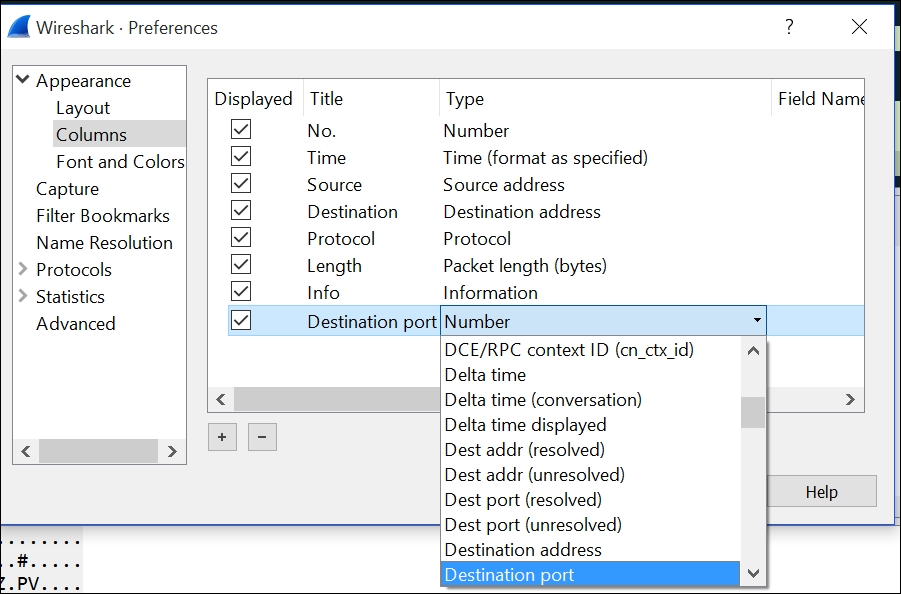
First, add a new column that shows, for instance, the destination port. All the different columns allow us to perform sorts and makes it easier to get the correct data.

This can be done by going into Edit | Preferences | Appearance | Columns. Click on the + sign and give it a name; click on the newly created column under Type and choose what kind of data that should be added, as shown in the following screenshot:

Next we need to enable name resolution. By default, a trace file does not resolve IP addresses into hostnames; therefore it might become cumbersome to analyze traffic without knowing where the traffic comes from.

We can enable this in Wireshark, and allow it to list all the IP addresses and query the DNS server...

CONTINUE READING
83
Tech Concepts
36
Programming languages
73
Tech Tools
Icon Unlimited access to the largest independent learning library in tech of over 8,000 expert-authored tech books and videos.
Icon Innovative learning tools, including AI book assistants, code context explainers, and text-to-speech.
Icon 50+ new titles added per month and exclusive early access to books as they are being written.
Mastering Netscaler VPX
notes
bookmark Notes and Bookmarks search Search in title playlist Add to playlist font-size Font size

Change the font size

margin-width Margin width

Change margin width

day-mode Day/Sepia/Night Modes

Change background colour

Close icon Search
Country selected

Close icon Your notes and bookmarks

Confirmation

Modal Close icon
claim successful

Buy this book with your credits?

Modal Close icon
Are you sure you want to buy this book with one of your credits?
Close
YES, BUY

Submit Your Feedback

Modal Close icon
Modal Close icon
Modal Close icon